
DocSend Alternatives (2026): 5 Doc Sharing Tools Compared
Nov 23, 2026
Did they read it? And then what?
DocSend made one question easy to answer: did they open the deck, and which pages did they read? More than 34,000 companies use it to share and manage sensitive information, per DocSend's G2 profile.
The harder question comes next. Who follows up, with what, and does the buyer ever come back? That's where DocSend alternatives split.
Our shortlist: pf1 for turning what buyers read into deal-specific decks, proposals and deal rooms, Papermark for a cheaper, open-source link tracker, and Digify for locked-down data rooms. PandaDoc suits documents that need signing, and Qwilr suits proposals buyers accept and pay on one page.
pf1 (from the house of Paperflite) publishes this guide, and our Distribution agent is one of the tools listed. We put ourselves first because it's our blog; every tool, including ours, is judged on the same criteria.
Quick picks
| Tool | Best for | Starts at |
|---|---|---|
| DocSend | Founders, dealmakers and sales teams that want page-by-page tracking and secure data rooms from a Dropbox company | $10 per user a month; data rooms from $150 a month for three users |
| pf1 | Customer-facing teams that want every shared asset to lead somewhere: deal-specific decks, proposals and deal rooms built from CRM data, with follow-up guided by what buyers read | Free migration from DocSend. Custom pricing; contact pf1 for a quote |
| Papermark | Startups and small teams that want DocSend-style tracking for less, with a free plan and an open-source option | Free; paid plans from €24 a month |
| Digify | Teams sharing sensitive files that need control even after a download | From $140 a month (reported) |
| PandaDoc | Sales teams whose documents need signing, pricing tables and CRM data | Free for 5 documents a month; from $19 per seat a month billed annually |
| Qwilr | Teams that send proposals and quotes buyers can accept and pay on one page | From $35 per user a month billed annually |
Prices checked as of Nov 23, 2026, on each vendor's pricing page; Digify's figure is from Capterra and GetApp listings.
Where DocSend shines
DocSend is Dropbox's secure document sharing and data room product. It turns a file into a tracked link, so you see who opened it, which pages they read and for how long, and you control who gets in.
The analytics are the product. Visit tracking comes on every plan, and Standard adds video and rich media analytics, per DocSend's pricing page (Nov 2026). Visit data can sync to Salesforce as tasks through a paid add-on.
It guards what you send. Advanced plans add NDAs and gating agreements before viewing, branded subdomains and Spaces, DocSend's data rooms. Signatures are built in: four a month per user on Personal, unlimited from Standard.
AI has arrived, quietly. In 2026 DocSend added AI that organizes data room folders, an AI Data Room Assistant that answers admins' questions and updates settings, and a beta MCP server for ChatGPT and Claude, per Dropbox's help center.
Users like it. DocSend holds 4.6 out of 5 on G2 from about 590 reviews, and reviewers most often praise its ease of use and document management.
Why do teams look past DocSend?
The reasons fall into two camps: cost for small teams, and what happens after the open for sales teams.
- The price climbs fast. Personal is $10 per user a month, but data rooms start on Advanced at $150 a month for three users, and Salesforce sync and SSO cost extra on top, per DocSend's pricing page. "Expensive" is the con G2 reviewers raise most.
- The app itself frustrates some users. App functionality is the next most common con on G2, and some reviewers say formatting can shift when files move into DocSend.
- It tells you who read it, not what to send next. DocSend's AI helps admins organize data rooms. Building the follow-up deck or proposal, and choosing what to send, still sits with the rep.
- Every asset is a file. DocSend tracks PDFs, decks and videos you upload. Interactive pages, proposals buyers can accept, or content built for one deal come from other tools.
Two kinds of DocSend alternative
Before comparing features, decide what DocSend does for you today. Most teams use it for one of two jobs.
If DocSend is your secure sharing or data room tool, you want the same tracking and control for less, or tighter control than DocSend offers. Look at Papermark for price and an open-source option, and Digify for protection that stays on files after download.
If DocSend is how your team sells, tracking the open is only step one. You want help with what comes next: content built for the deal, a place for the buying group, a signature or a payment. Look at pf1, PandaDoc and Qwilr.
How we judged them
We judged every tool, including ours, on five criteria:
- Tracking: what you learn about who opened what, and how far that reaches into your CRM.
- Control: access rules, watermarks, NDAs and data rooms.
- After the open: whether the tool helps build and send the next asset, gather the buying group or close.
- Cost: published pricing, seat bundles and the add-ons that change the real price.
- Governance: approved content, SSO, audit trails and SOC 2.
What we checked. We read each tool's product pages, help docs, pricing pages and release notes, independent reviews and dated coverage, in November 2026. Our team has used several of these tools firsthand and sat in on many of these vendors' sales calls, so we know how they sell, price and plan their roadmaps.
The 5 best DocSend alternatives in 2026
Each tool gets the same five checks. The first is pf1, then the two secure-sharing tools, then the two built for proposals and signatures.
1. pf1 (from the house of Paperflite): for what happens after the open
Best for. Customer-facing teams that want every shared asset to lead somewhere: deal-specific decks, proposals and deal rooms built from CRM data, with follow-up guided by what buyers read.
What it is. pf1 is an agentic growth team for sales and marketing: AI agents that work from your approved company knowledge and learn from what buyers do. For a DocSend team, the open stops being the finish line. pf1 shows what each buyer read, then helps the rep send the next right thing.
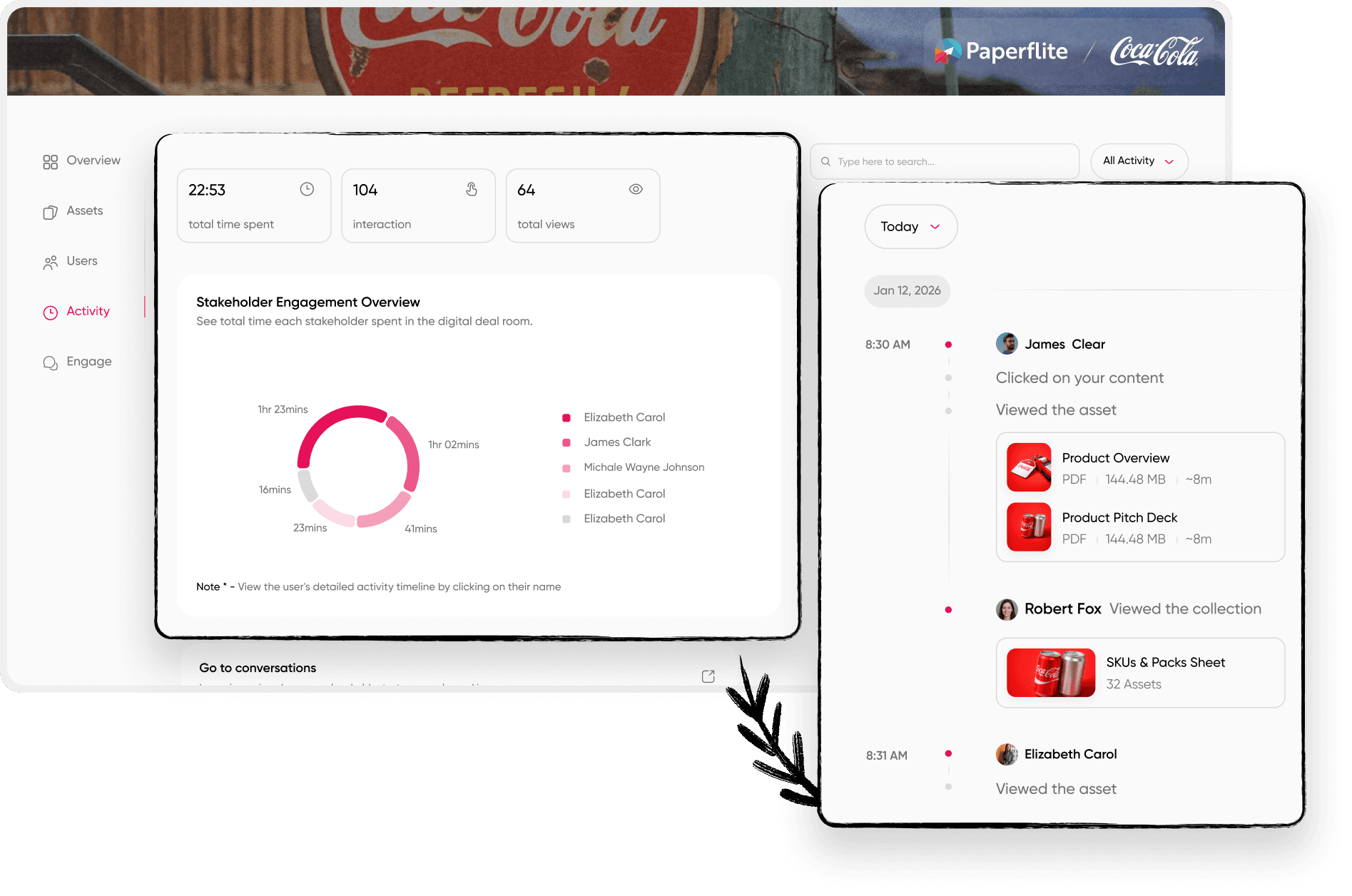
The Distribution agent tracks every asset, page and visit, and suggests follow-up based on what buyers read. The Deal agent builds deal-specific decks, proposals and deal rooms from CRM data and content that has won before. The Experience agent turns approved content into interactive marketing assets and pages.
Both products now talk about AI. DocSend's AI helps admins organize data rooms; pf1's agents build what reps send next, from approved content. Customers named on pf1.ai include ServiceNow, e2open, HP and CBRE, and approval gates, audit trails, SSO and SOC 2 Type 2 audits sit behind it (security and compliance).
What it does that DocSend doesn't:
- Deal-specific decks and proposals built from CRM deal data, winning content and strategy insights (Deal agent)
- Deal health scored against your own won and lost deals
- Interactive pages and marketing assets built from your content, not just tracked files (Experience agent)
- New assets for reps, generated from content performance and deal outcomes, so one rep's win becomes a pattern the whole team repeats
- Company-level identification of website visitors, with assets gated by intent (Lead agent)
- AI roleplays and coaching grounded in the same approved content reps share (Coaching agent)
In practice. Grammarly reached a 30% conversion rate on an interactive report, per pf1.ai (Grammarly story). It was built on Cleverstory, which now runs inside pf1 as the Experience agent and the Lead agent.
Watch-outs. pf1 has no free or self-serve plan. It's built for teams, not individuals, and it's strongest when your content and CRM deal data are connected to pf1.
Pricing. Free migration from DocSend. Custom pricing; contact pf1 for a quote.
2. Papermark: for DocSend-style tracking on a smaller budget
Best for. Startups and small teams that want DocSend-style tracking for less, with a free plan and an open-source option.
What it is. Papermark is an open-source document sharing and data room tool. Every plan includes unlimited visitors and page-by-page analytics, and prices are flat rather than per seat, per Papermark's pricing page (Nov 2026).
What it does that DocSend doesn't:
- A free plan and an open-source codebase you can self-host
- Flat team pricing: the Data Rooms plan includes three team members and unlimited data rooms
- An API, CLI and MCP server included with Data Rooms, per its pricing page
Watch-outs. NDAs before access, dynamic watermarks and custom domains for data rooms start on the Data Rooms plan. E-signature runs through an integration such as DocuSign rather than inside Papermark. Prices are listed in euros.
Pricing. Free plan; Pro from €24 a month and Business from €59 a month, billed annually. Data Rooms is €99 a month billed annually, or €149 billed monthly.
3. Digify: for files that stay protected after download
Best for. Teams sharing sensitive files that need control even after a download.
What it is. Digify is a secure document sharing and data room tool built around digital rights management. Its Persistent Protection After Download encrypts files and ties them to your viewing rules, so you can revoke access even after a file is downloaded, per Digify's site.
What it does that DocSend doesn't:
- Revoke access to files after they've been downloaded
- Screen Shield, which narrows the visible area and blurs content when a screenshot attempt is detected
- A choice of data region for file storage across several countries, per Digify's site
Watch-outs. There's no free plan. Digify is built for protecting and tracking files, not for building proposals or follow-up content, and e-signature redirects to Adobe Sign or DocuSign.
Pricing. Pro is listed from $140 a month on Capterra and GetApp, with Enterprise by quote. Check Digify's pricing page for current tiers.
4. PandaDoc: for documents that need signing
Best for. Sales teams whose documents need signing, pricing tables and CRM data.
What it is. PandaDoc is a document automation and e-signature platform. Teams build proposals, quotes and contracts from templates, send them for signature and track when recipients open them.
What it does that DocSend doesn't:
- Proposals and quotes built from templates, with pricing tables and payment collection on Business
- Unlimited e-signatures on paid plans
- CPQ and workflow automation on Enterprise, per PandaDoc's pricing page
Watch-outs. Starter is capped at five templates, and pricing tables, payment collection, CRM integrations and recipient analytics start on Business, per PandaDoc's pricing page (Oct 2026). Seats add up quickly on larger teams.
Pricing. Free plan for 5 documents a month. Starter is $19 per seat a month and Business $49, billed annually ($35 and $65 billed monthly). Enterprise by quote.
5. Qwilr: for proposals buyers accept and pay on one page
Best for. Teams that send proposals and quotes buyers can accept and pay on one page.
What it is. Qwilr turns proposals and quotes into interactive web pages with e-signature, payments and analytics built in. In 2026 it moved to three plans: Starter, Growth and Scale.
What it does that DocSend doesn't:
- Proposals as interactive web pages, with quotes buyers can accept and pay on the page
- AI Prefill and a Smart Proposal Engine on Scale, per Qwilr's pricing page
- HubSpot on every plan, with Salesforce on Scale
Watch-outs. Growth and Scale bill annually only, with five- and ten-seat minimums. Analytics history runs 60 days on Starter and 120 on Growth.
Pricing. Starter is $35 per user a month billed annually, or $49 monthly. Growth is $55 and Scale $75 per user a month, billed annually.
How DocSend and the alternatives compare
Two tables, because the tools overlap on the basics and split on what happens next.
What DocSend and the alternatives share
| Capability | DocSend | pf1 | Papermark | Digify | PandaDoc | Qwilr |
|---|---|---|---|---|---|---|
| Tracking of who viewed and for how long | ✓ | ✓ | ✓ | ✓ | ✓ | ✓ |
| Data rooms or deal rooms | ✓ (Advanced) | ✓ | ✓ | ✓ | ✓ (Rooms) | – |
| Dynamic watermarking | ✓ (Advanced) | – | ✓ (Data Rooms) | ✓ | Not found | Not found |
| E-signature | ✓ | ✓ | Via DocuSign | Via Adobe Sign or DocuSign | ✓ | ✓ |
| Viewer activity in your CRM | Salesforce add-on | ✓ | Via webhooks | Not found | ✓ (Business) | ✓ (HubSpot; Salesforce on Scale) |
| AI features | Data room assistant and folder organizing | ✓ | MCP server | Not found | ✓ | ✓ |
Where pf1 goes further
| Capability | DocSend | pf1 | Papermark | Digify | PandaDoc | Qwilr |
|---|---|---|---|---|---|---|
| Deal-specific decks and proposals from CRM data | – | ✓ | – | – | ✓ (templates) | ✓ (Scale) |
| Interactive pages built from your content | – | ✓ | – | – | – | ✓ |
| Deal health scored against your own won and lost deals | – | ✓ | – | – | – | – |
| New rep assets generated from content performance and deal outcomes | – | ✓ | – | – | – | – |
| Company-level identification of website visitors | – | ✓ | – | – | – | – |
| AI roleplays and coaching from approved content | – | ✓ | – | – | – | – |
✓ means the feature is documented on the vendor's site or pricing page; "Not found" means we couldn't confirm it in public docs as of Nov 2026, and – means it isn't offered. Plan names show where a feature starts.
DocSend pricing next to the alternatives
DocSend has no free plan, only a 14-day trial of Advanced Data Rooms. Here's what each tool publishes.
| Tool | Free plan | Entry price | Data rooms from |
|---|---|---|---|
| DocSend | No (14-day trial) | $10 per user a month (Personal) | $150 a month for 3 users (Advanced) |
| pf1 | No | Free migration from DocSend. Custom pricing; contact pf1 for a quote | Included in the quote |
| Papermark | Yes | €24 a month (Pro, annual) | €99 a month for 3 members (annual) |
| Digify | No | $140 a month (Pro, reported) | Included from Pro (reported) |
| PandaDoc | Yes (5 documents a month) | $19 per seat a month (Starter, annual) | Rooms; check plan |
| Qwilr | No (14-day trial) | $35 per user a month (Starter, annual) | Not offered |
DocSend's other tiers: Standard is $45 per user a month and Advanced Data Rooms is $180 a month for three users, per DocSend's pricing page (Nov 2026).
Which DocSend alternative fits your job?
| If you need to… | Look at | Why |
|---|---|---|
| Share decks and data rooms for less | Papermark | Free plan, flat pricing and an open-source option |
| Keep control of files after they're downloaded | pf1 or Digify | Control who can open shared files, even after they've been downloaded |
| Get documents signed and paid | pf1, PandaDoc or Qwilr | E-signature in the document; PandaDoc and Qwilr also take payments |
| Turn what buyers read into the next deal-specific deck, proposal or deal room | pf1 | Agents build follow-up from CRM data and content that has won before |
| Stay inside Dropbox | DocSend | Page analytics, Spaces and e-signature from the same company |
Moving off DocSend
Plan the switch around links, not files.
- List your live links and Spaces. Investors and buyers may still open old DocSend links, so decide which to keep live during the move.
- Export visit history you need. Pull reports on active deals or raises before you close the account.
- Rebuild access rules first. Recreate passcodes, email checks, NDAs and watermarks before you resend anything sensitive.
- Resend with context. A switch is a good moment to send each buyer a cleaner, deal-specific version, not the same deck in a new link.
The verdict
DocSend is still a strong choice for page-by-page tracking and secure data rooms, especially for teams already on Dropbox. If price is the issue, Papermark covers the same ground for less. If control after download matters most, choose Digify. If the document has to be signed or paid, PandaDoc and Qwilr fit.
If you want the open to lead somewhere, look at pf1: it builds the deal-specific deck, proposal or deal room that comes next.
DocSend alternatives: FAQ
What is the best DocSend alternative?
It depends on the job: Papermark for cheaper tracked links and data rooms, Digify for control after download, and PandaDoc or Qwilr for documents that need signing. For turning what buyers read into deal-specific decks, proposals and deal rooms, pf1.
Is there a free DocSend alternative?
Yes. Papermark has a free plan with page-by-page analytics and is open source, and PandaDoc has a free plan for five documents a month. DocSend itself has no free plan, only a 14-day trial of Advanced Data Rooms.
How much does DocSend cost compared with Papermark and PandaDoc?
DocSend starts at $10 per user a month, and data rooms start at $150 a month for three users. Papermark's Data Rooms plan is €99 a month billed annually for three members. PandaDoc starts at $19 per seat a month billed annually, without data rooms on that tier.
Is DocSend worth it?
For founders and dealmakers who need page-by-page tracking and secure data rooms, often yes: it holds 4.6 out of 5 on G2. Teams that find it expensive, or want help with follow-up content, often look at the alternatives above.
Is DocSend different from Dropbox?
Yes. Dropbox is cloud file storage; DocSend shares files as tracked, controlled links and data rooms. Dropbox bought DocSend in 2021 for about $165 million, and it's now sold as Dropbox DocSend.
What do DocSend reviews say?
On G2, DocSend rates 4.6 out of 5 from about 590 reviews. Reviewers praise ease of use and document management. The most common complaints are price and app functionality, including formatting that can shift when files are uploaded.
Who are DocSend's competitors?
Papermark and Digify compete on secure sharing and data rooms; PandaDoc and Qwilr on proposals, e-signature and payments. pf1 competes on what happens after the open: deal-specific content, deal rooms and follow-up from what buyers read.
DocSend vs pf1: what's the difference?
DocSend tells you who opened a file and which pages they read. pf1 also tracks engagement, then its agents build the deal-specific deck, proposal or deal room that comes next, from CRM data and approved content. Moving your content over from DocSend to pf1 is free.
Sources
- TechCrunch: Dropbox to acquire secure document sharing startup DocSend for $165M (March 2021)
- Dropbox Form 8-K, Q1 2021 results, on completing the DocSend acquisition (SEC)
- G2 reviews of DocSend, Papermark, PandaDoc and Qwilr (ratings and review themes, Nov 2026)
- Capterra and GetApp listings for Digify pricing (Nov 2026)
- pf1: Distribution agent, Deal agent, Experience agent, Lead agent, Coaching agent, security and compliance, Grammarly story
Paperflite's Content Technologyin Action
It's Easier Than Falling Off a Log
(Don't Ask Us How We Know That)

