
Proposal Templates: 5 Formats for Sales Proposals and RFPs
Nov 06, 2026
A proposal template is a reusable document structure that pre-sets the sections of a proposal, such as the executive summary, scope, pricing and terms, so sellers customize only the buyer-specific details. It shortens drafting time and keeps pricing, branding and claims consistent across every deal and RFP response.
Most of the proposal templates you will find online solve one problem: getting a first draft onto the page. This guide covers five formats (sales, business, project, RFP response and services), points you to a free example of each, and then spends time on the part template galleries skip, which is what happens after the proposal lands in the buyer's inbox.
The 5 formats at a glance
- Sales proposal: best for pitching a product or service to a prospect. Example from Office Templates Online. File type: Word.
- Business proposal: best for pitching your company to clients, investors or partners. Example from ProjectManager. File type: Word.
- Project proposal: best for scoping work and getting budget and sign-off. Example from Smartsheet. File types: Word, PDF, Google Docs.
- RFP response: best for answering a buyer's formal request for proposal. Example from ProjectManager (bid proposal). File type: Word.
- Services or consulting proposal: best for selling ongoing or defined service work. Example from Microsoft Create. File type: Word.
What should a proposal template include?
A proposal template should include a cover page, an executive summary, the buyer's problem, your proposed solution and scope, pricing, a timeline, and terms with a clear next step. Longer formats add case studies and team bios, and RFP responses follow whatever sections and numbering the issuer asks for.
Think of the template as a recipe card. It tells you which ingredients go in and in what order, but it does not cook the dinner for this particular guest. For the section-by-section walkthrough of writing each part, our guide on how to write a sales proposal goes deeper, so this page stays focused on choosing and using the template itself. The core sections, in the order buyers expect them:
- Cover page and contact details
- Executive summary
- The buyer's problem or goal
- Proposed solution and scope
- Pricing (with options, where you can)
- Timeline and milestones
- Terms, signature and next step
5 proposal template formats
Each format below links to a real template that is free to download, so you can see the structure before you commit to one.
1. Sales proposal template
Use this when a seller pitches a product or service to a prospect who needs price, outcome and next steps in one place. Office Templates Online's sales proposal template is a free Word download from a library of professionally formatted proposal templates. It is built to present objectives, deliverables, pricing and timelines in a logical order, which is the sequence a buyer scans for first.
Image: Office Templates Online
Tailoring tip: lead the executive summary with the buyer's own words from your last call. A prospect who sees their phrasing on page one keeps reading.
2. Business proposal template
Use this to pitch your company to clients, investors or partners. ProjectManager's business proposal template is a free Word download. It lays out a summary of the client's problem, your proposed solution, pricing, a timeline and the terms of the engagement, in Word so you can edit the language for each client.
Image: ProjectManager
Tailoring tip: keep the problem summary to what the buyer told you, not what you wish they had said. Everything after it reads better when the first section is accurate.
3. Project proposal template
Use this when the job is to scope work and secure budget and approval, whether the reader is a client or an internal sponsor. Smartsheet's project proposal templates come as a library of free downloads. The simple project proposal template, for example, has direct Word, PDF and Google Docs links and covers timeline, budget, team resources, benefits and a client signature. Other templates in the library add research, construction, marketing and IT variants.
Image: Smartsheet
Tailoring tip: write down what is out of scope. A single line on exclusions heads off more scope arguments than a page of deliverables.
4. RFP response template
Use this when a buyer has issued a formal request for proposal and the structure is partly dictated for you. ProjectManager's bid proposal template is a free Word template for the formal response to a client's request. It opens with an executive summary and moves through the provider's pitch, scope of work, cost forecast, timeline and terms, and it showcases your qualifications and approach.
Image: ProjectManager
Tailoring tip: mirror the issuer's numbering and terminology, and reorder your answers to match how they will score them. A response template is a living library of reusable sections, and the time it saves should go into tailoring, so refresh the bios and references at least quarterly.
5. Services or consulting proposal template
Use this when you sell ongoing or defined service work and the buyer wants to see process and proof. Microsoft Create's business services proposal is an accessible Word template. It is divided into sections that outline your company, objective, approach and expected deliverables, and it provides scheduling and pricing, with pre-formatted tables for the details.
Image: Microsoft Create
Tailoring tip: swap in the case study closest to the buyer's industry and size. One relevant story beats three generic ones.
Word, Google Docs, PDF or a live page: which format fits?
Word and Google Docs suit proposals that need heavy editing and several reviewers, a PDF suits a finished document with one decision-maker, and a live page suits deals where several stakeholders read the proposal and you want to see who engaged. The file type matters less than who reads it and how many of them there are.
Live proposal pages cover the other end of that range. Instead of attaching a file, you send a link, and the page can be updated after it goes out. Pick by fit: the size of your buying group, how many proposals you send, and whether you need to see who read what.
How to customize a proposal template without it reading like a template
Customizing a proposal template means swapping in the buyer's language, cutting the sections they do not need, and choosing proof that matches their situation. A proposal that still carries another client's name in the footer costs you credibility before page two.
Three changes do most of the work:
- Open with the buyer's problem in their own words, pulled from call notes or the RFP itself.
- Delete any section that does not answer a question this buyer has asked.
- Swap in the case study, price option and next step that fit their size and industry.
There is a bigger reason to tailor, and it is the number of people on the other side. Gartner's survey of 632 B2B buyers found that buying groups range from five to 16 people across as many as four functions, and that 74% of those teams showed unhealthy conflict during the decision. Groups that reached consensus were 2.5 times more likely to report a high-quality deal. In practice, your proposal will be read by people who never joined your call, and its job is to help your champion get a room of different priorities to agree.
The same research points to how to tailor. Buyers who experienced relevance at the buying-group level, not just for themselves, were three times more likely to report a high-quality deal. So the executive summary should make sense to the finance lead and the technical evaluator as well as to your main contact.
What happens after you send the proposal
A template helps you write a proposal. But getting it written is only half the job. Once it's sent, it might reach five decision-makers, get discussed in three meetings, or sit unopened in someone's inbox. And you're left wondering what happened.
That's where pf1.ai (from the house of Paperflite) comes in. Its AI agents work together across the sales process, from creating a proposal to understanding how buyers respond and what should happen next.
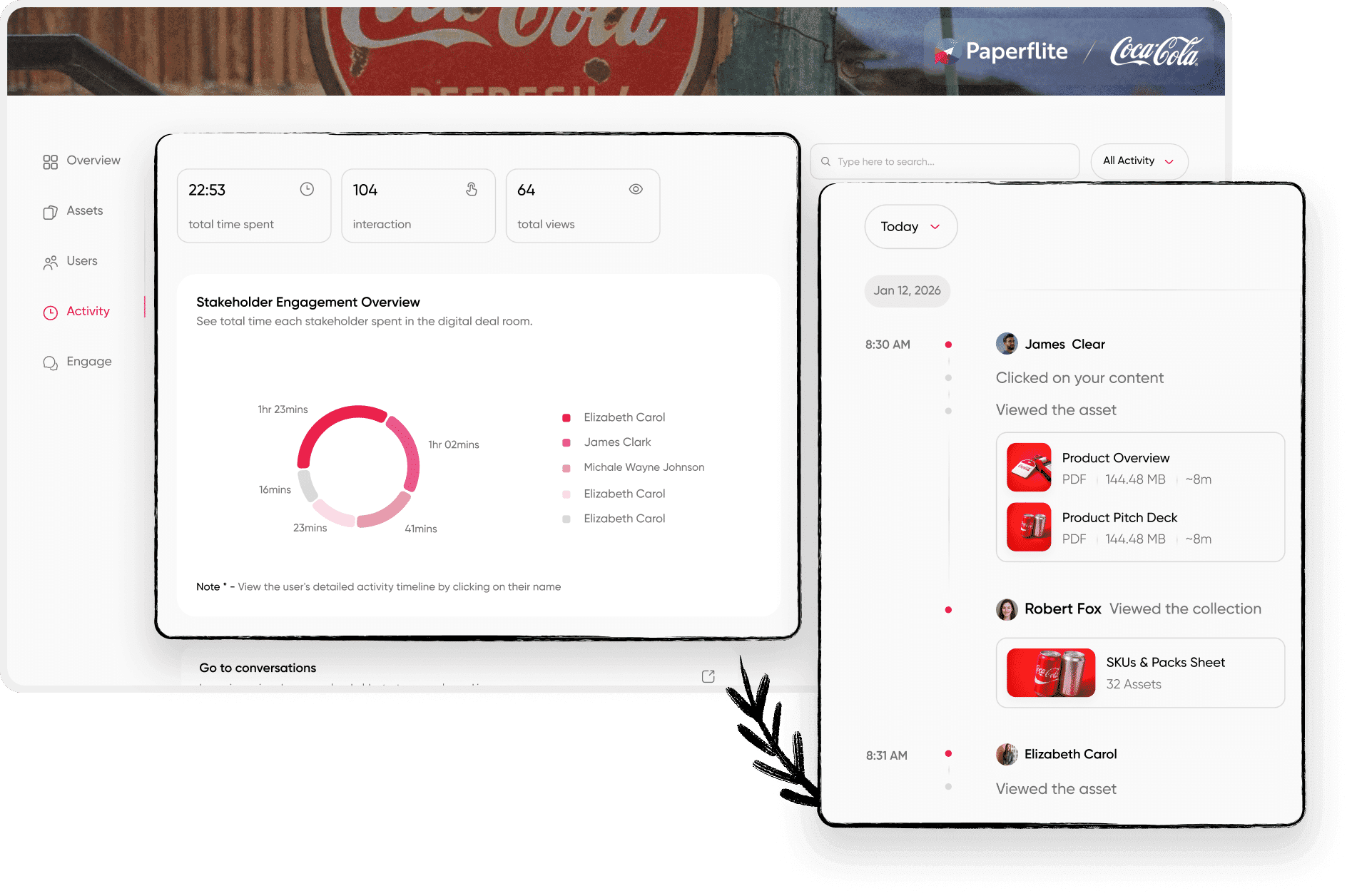
When more stakeholders join the conversation, everyone can work from the same information. The Distribution agent helps ensure the content reaching them is accurate, approved, and current, while tracking how buyers engage with what you've shared. And here's where things get interesting. The Deal agent looks beyond whether someone opened your proposal. It brings together content engagement, CRM activity, emails, and conversations to understand how the opportunity is progressing.
Did the buying committee engage? Has interest dropped after the pricing discussion? Is the deal moving forward, or does it only look that way in your CRM?
Deal evaluates these signals against your company's previous wins and losses, identifies potential risks, and recommends what your rep should do next. So instead of sending another hopeful "just checking in" email, your team can follow up with something relevant to what the buyer actually needs.
The best part is that these agents don't work in isolation. What Distribution learns from buyer engagement can inform Deal's assessment, while Experience agent can use those insights to shape future buyer experiences. The proposal is no longer just something you send. It's part of a conversation you can understand and act on. To explore the experience itself, start with our guide to digital sales rooms. For a closer look at how shared content and buyer engagement come together, explore the Deal agent and Distribution agent.
Also, to know more about how this works as a category, start with what a digital sales room is. For a comparison checklist, the rundown of digital sales room features covers what to look for.
Start from the format that matches the decision in front of you
Choose by who decides and how many people read. One decision-maker and a short deal fit a business or services proposal. A buying committee fits a sales proposal sent as a live page. A formal procurement fits an RFP response template, and an internal approval fits a project proposal template. Whichever proposal templates you pick, customize the content and send it somewhere you can see what happens next.
Frequently asked questions
What is a proposal template?
A proposal template is a reusable document structure that pre-sets the sections of a proposal, such as the executive summary, scope, pricing and terms. You fill in the buyer-specific details for each deal instead of starting from a blank page, which saves drafting time and keeps pricing and branding consistent.
What is the difference between a proposal and a quote?
A quote states the price for a defined set of goods or services. A proposal explains the buyer's problem, your solution, the scope, the timeline and the price, and it makes the case for choosing you. Many proposals contain a quote as the pricing section.
How long should a proposal be?
A proposal should be as long as the buyer's decision requires. A short, single-decision deal can fit in a few pages, while a formal RFP response runs longer because the issuer sets the sections and the level of detail. Cut any section that does not answer a question this buyer has asked.
What is an RFP response template?
An RFP response template is a pre-built library of the sections most responses need, such as a cover letter, company overview, relevant experience, proposed solution, timeline and budget. You tailor it to each issuer's terminology and scoring instead of rebuilding it under deadline.
Are Word or Google Docs templates enough?
For one decision-maker and a small number of proposals, a Word or Google Docs template works well. Once several stakeholders read the proposal or you send many each month, a live page or a Deal Room gives you more visibility into who engaged and what they read.
How do you track whether a proposal was read?
Send the proposal through a platform that records opens and time spent instead of attaching a file to an email. In a pf1.ai Deal Room, you can see who opened the material, how long each person spent on it and who has gone quiet, so your follow-up goes to the people who engaged.
Can I reuse one proposal template for every deal?
You can reuse the structure for every deal, but the content needs tailoring each time. Keep the section order, formatting and approved claims, then replace the problem statement, case study, pricing options and next step with details that fit the buyer.
Paperflite's Content Technologyin Action
It's Easier Than Falling Off a Log
(Don't Ask Us How We Know That)

